Content Automation Platforms: What They Do and How to Pick One
Learn how content automation platforms work, which channels they cover, and how to choose one for your business.
RankHabit team · 13 min read

Content automation platforms are software that plans, writes, schedules and publishes marketing content for you, so you spend less time producing each piece by hand. Some cover social and email, others focus on SEO blog posts. This article covers what they do, how each content type is handled, and how to pick one.
What Content Automation Platforms Do
Content automation platforms are software tools that handle the repetitive steps of getting content from idea to published page: planning, drafting, review, and publishing. Instead of writing every post yourself, briefing a freelancer, and pasting text into your CMS, you set the topic or keyword once and the platform moves the work along.

What that means in practice depends on the platform. Some generate content briefs and stop there. Others write a draft for you to edit, and some produce a finished article ready to go live. The core functions are the same across all of them:
- Planning: turning keywords or topics into briefs and a content calendar.
- Creation: generating drafts or full articles with AI, which is where content creation automation does most of its work.
- Approval: routing each piece to a person who can edit, approve, or reject it.
- Publishing and content distribution: pushing approved pieces to your site or other channels on a schedule.
The approval step is the one to check closely. A platform that publishes straight from AI output with no human sign-off saves the most time, but you give up control over what carries your name. A good one holds every article until you say yes.
This is also where the category splits. General marketing automation tools mostly schedule email and social posts you have already written. SEO-focused tools, such as RankHabit, which plans and publishes blog articles with your approval built in, focus on producing the articles themselves. Knowing which kind you need saves you from paying for features you won't use.
Content Automation Platforms for Different Content Types
Blog and SEO content
Blog and SEO content platforms are built around one job: getting articles to rank in search. They plan topics from keywords, draft full articles, and push them to your site. Blog automation of this kind covers keyword research, content briefs, writing, and publishing, so the output is long-form pages meant to bring in search traffic over time.
They don't send emails or post to social feeds. RankHabit sits in this group. It plans SEO articles, generates them, and publishes to your site, with an approval step so nothing goes live until you've signed off.
Social media and email content
General marketing automation tools work on a different problem: reaching people you already have or can reach directly. Social media scheduling tools queue posts across networks at set times. Email automation tools send newsletters, welcome sequences, and triggered messages based on what a subscriber does. The content is short, the shelf life is short, and the goal is attention or conversion now, not rankings later.
That difference matters when you compare tools. A scheduler can place a post at 9 a.m. on three networks, but it won't research which keywords your site should target. A blog automation tool can publish an article, but it won't run a drip campaign.
Multi-channel platforms
Some platforms try to cover several content types from one dashboard: a blog post, a few social posts, and an email, all drafted and scheduled in one place. That's convenient if you want one login and one calendar. The trade-off is depth. A tool spread across five channels usually does each one more shallowly than a specialist.
So start with what you need most:
- Search traffic first: pick an SEO-focused tool and treat social and email as follow-up work.
- Social reach or list growth first: pick a scheduler or email platform.
- Both, at modest volume: a multi-channel platform may be enough.
If your goal is steady organic traffic to a site, the blog side deserves the specialist.
Popular Content Automation Platforms and Their Features
Outrank
Outrank is an AI SEO writing tool that plans and produces articles on a schedule, aimed at businesses that want blog content published without writing it themselves. It suits owners and small marketing teams who care more about steady output than about hands-on editing of every draft. The strength is hands-off volume: you set it up once and articles keep coming.
The limit is control, because how much you can review and change before something goes live depends on how you configure it. If you need sign-off on every piece, check that workflow before committing. For a side-by-side look, see how RankHabit compares to other platforms.
rank.ai
rank.ai sits in the same group of SEO automation tools: software that handles article planning and writing so you don't start from a blank page. It fits marketing teams that want AI to do the first draft and the topic selection, then decide how much to edit themselves. The upside is less manual research and drafting. The downside is the same one you should weigh with any tool in this category: AI output varies in quality, so the review step matters more than the writing speed. Compare how each tool handles approval, editing and publishing before you pick one.
RankHabit (ours)
It automates content publishing with a workflow built in. You see each article before it publishes, and nothing goes out without your sign-off. That is the main difference from tools that publish on autopilot.
It suits business owners and teams who want articles produced without writing them, but who still want the final say. It is built around blog content only. It may not cover all your content needs. For a concrete use case, see how it handles SEO articles for your SaaS business, or read the RankHabit vs AutoPush and RankHabit vs BabyLoveGrowth comparisons.
AutoPush
AutoPush is another tool built around automated SEO article creation and publishing. It suits teams that want a lower-effort route to a regularly updated blog. Its appeal is the same as the rest of this category: less time spent on drafting and uploading.
What to check is how much review you get before an article reaches your site, and how it connects to your content management setup, whether that is WordPress or a website builder. A tool that writes quickly but publishes awkwardly just moves the bottleneck. Our AutoPush alternatives page lays out the differences in more detail.
BabyLoveGrowth
BabyLoveGrowth is an AI SEO content tool that generates articles aimed at growing organic traffic. It is a fit for founders and small teams who want article publishing handled with little daily input. The strength is the reduced workload on research and drafting.
The limit to watch is how much you can steer topics, tone and edits before publication, since automated tools differ widely here. Match the tool to your volume and your tolerance for oversight: if you publish a few posts a month, heavy automation matters less than approval control. Our BabyLoveGrowth alternatives page covers other options.
SEObot
SEObot is an AI tool for generating SEO articles, positioned for people who want blog output without a writing process. It suits solo operators, creators and small sites that value speed and a simple setup. Its strength is how little you have to do to get content moving.
The limit is the one that applies across this whole category: the less you touch the workflow, the more you rely on the AI getting facts, structure and brand voice right. Before choosing, test a few drafts against your own standards, and confirm how it publishes to your site. See our SEObot alternatives page for comparisons.
How Content Automation Actually Works: From Brief to Published
Content automation takes an article from keyword to live post in four steps, and the only one that should stay fully in your hands is approval. The software handles research, drafting and publishing. You decide what goes out.
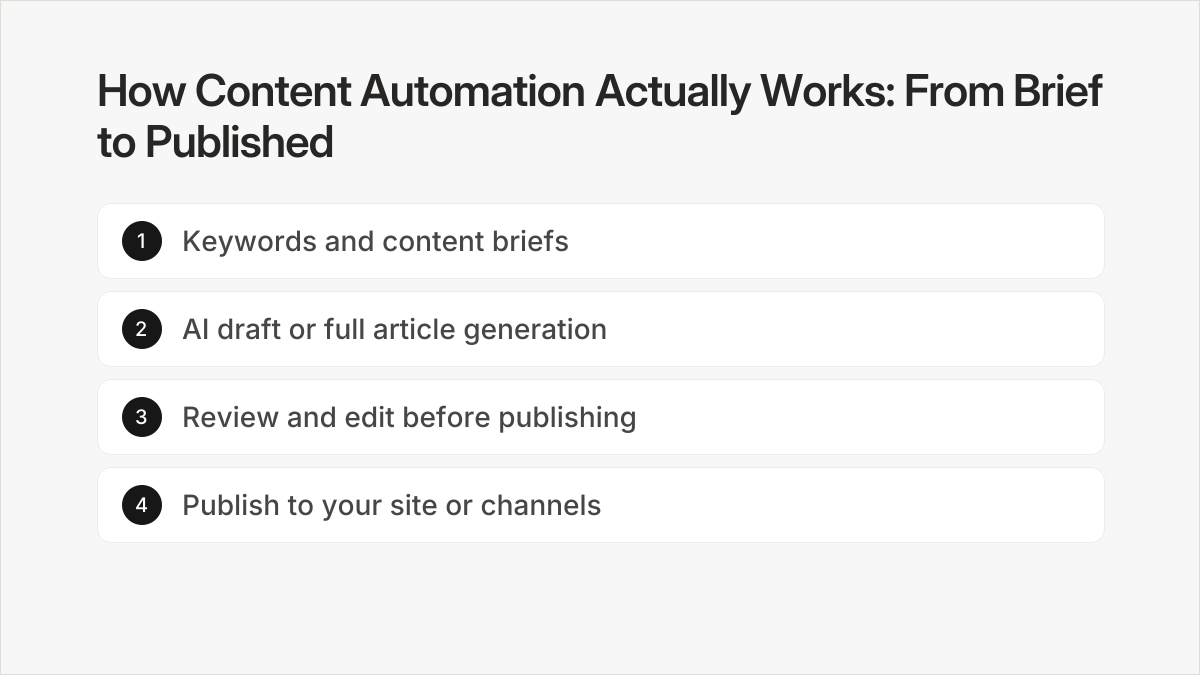
Here is the article workflow in the order it happens:
- Pick the keywords and set the brief. Start with the topics you want to rank for, either from your own list or from keyword suggestions the platform generates for your niche. Each keyword becomes a brief that fixes the angle, the headings and the search intent the article has to match.
- Generate the draft. The platform writes the full article from that brief, in the voice and with the details you gave it. This is where tools differ most, so check that it uses your product facts rather than filler.
- Review, edit and approve. Read each draft before it goes anywhere. Rewrite lines, cut sections, or ask for a fresh version if the draft misses the point. Content approval is a gate, not a formality: nothing should publish until you sign off.
- Publish to your site. Once you approve an article, the platform pushes it to your CMS or blog, so you skip copying, pasting and formatting. Publishing automation can also space articles out on a schedule instead of releasing them all at once.
Step 1: Keywords and content briefs
The workflow starts with a keyword, not a blank page. A good platform turns each keyword into a brief before any writing happens, so you can catch a wrong angle while it is still cheap to fix.
If you run a SaaS product, your keywords tend to be problem and comparison terms. A store needs category and buying-guide terms. An agency needs a separate list for each client. Whatever your business, the brief is where you set the topic, the audience and the points the article must cover.
Step 2: AI draft or full article generation
Next, the platform writes. Some tools only produce a rough draft you finish by hand. Others generate a complete article, with headings, body copy and structure, from the brief alone.
The difference matters for how much time you save. A rough draft still needs a writer. A full article needs a reader. If your goal is to publish without writing it yourself, you want the second kind, with the review step built in so quality does not depend on luck.
Step 3: Review and edit before publishing
This is the step general marketing automation tools tend to skip, and it is where you keep control. With RankHabit you can review, edit, and regenerate articles before anything goes live. If a draft is close, you edit it. If it misses, you regenerate it instead of starting over.
Check three things on every draft:
- Facts. Confirm that every claim about your product, prices and features is true.
- Fit. Make sure the article answers what the searcher actually wants.
- Voice. Read it aloud and see whether it sounds like your company.
AI can produce a plausible paragraph that is wrong, so a human read is not optional. Treat the platform as a fast first writer and yourself as the editor.
Step 4: Publish to your site or channels
Last, approved articles go live. For SEO content, that means your blog or CMS. For other content types, such as social posts or email, publishing means handing the content to those channels, which is why multi-channel tools and SEO-focused tools behave differently here.
Know what the platform does automatically and what it leaves to you. It handles formatting, scheduling and the push to your site. It does not decide your strategy, check your facts or guarantee rankings. Those stay with you, which is exactly why the approval step comes before publishing and not after.
Integration and Publishing: Where Your Content Goes
Integration and publishing is where a content automation platform either saves you time or hands you a new chore. Most tools write or schedule content well enough. The question is how that content gets onto your site or channels, and whether you have to move it by hand.
There are usually three routes. A direct connection to your CMS pushes the finished article straight to a draft or live post, which is how WordPress automation typically works. Some platforms also cover site builders such as Framer. A third route is webhook publishing: the platform sends the article to a URL you control, and your own system decides what to do with it.
That suits custom CMSs, but someone has to set it up. At the bottom of the list is manual export, where you copy text or download a file and paste it in yourself.
The difference matters once you scale. Pasting one article takes little effort. Pasting a steady stream does not, and formatting, images and metadata tend to break along the way.
Before you commit, check three things:
- Does the platform connect to your CMS directly, or only through export or webhooks?
- Can it publish as a draft so you approve before anything goes live?
- Does it fit the tools you already use, or will it sit apart from them?
RankHabit lists where your articles can publish automatically, so you can check your CMS against it before you sign up. Whichever platform you choose, test one article end to end first.
Time and Resource Savings with Content Automation
Content automation saves you the repetitive parts of publishing: drafting, formatting, uploading and scheduling. The hours you get back depend on how much of that work the tool actually takes off your plate, and on how much review you still do yourself.

A manual article involves several separate jobs. Someone researches keywords, writes a brief, drafts the piece, edits it, formats it in the CMS and hits publish. Automation platforms compress most of that chain. With a tool like RankHabit, the keyword planning, article generation and publishing steps run without you writing anything, and you step in at the approval stage. That is where your time goes: reading a draft, fixing what is off and signing it off, instead of producing it from a blank page.
The practical effects show up in three places:
- Content production speed. Moving from a handful of articles to dozens per month stops requiring a bigger writing team. The bottleneck shifts from drafting to approving.
- Team productivity. The people who used to write and format can spend their time on strategy, such as choosing which topics matter for your business and checking what the published pages actually do for you.
- Marketing efficiency. One person can oversee a publishing schedule that would otherwise need a writer, an editor and someone to handle uploads.
Be realistic about the limit. Saved time is not fixed. If you approve most drafts with light edits, you save a lot. If every article needs heavy rewriting for tone, accuracy or product detail, the savings shrink.
Agencies handling several clients and SaaS teams with technical content tend to review more closely than a store publishing straightforward guides. Plan your review time first, then judge the tool by how little editing its drafts need.
Frequently asked questions
What's the difference between content automation and social media automation?
Content automation covers the full chain of planning, writing, reviewing and publishing content, often long-form pieces like blog articles. Social media automation is narrower: it schedules and posts short updates to social accounts. The two overlap when a tool reuses one piece of content across channels, but a social scheduler does not research keywords or draft articles, and an SEO content tool usually does not manage your social calendar.
Do these platforms actually write good SEO content or just basic filler?
It depends on the platform and on how much control you keep. Tools that publish raw AI output with no review tend to produce generic filler. Tools built around keyword research, content briefs and a human approval step give you a chance to catch weak sections before anything goes live. Treat the AI as a drafting engine, and read every article before you approve it.
Can I use content automation for my blog and social media at the same time?
Yes, but usually with two kinds of tools. Multi-channel platforms try to cover blog, social and email in one place, which often means shallower SEO features. SEO-focused tools handle keyword planning and blog publishing in depth, and you pair them with a separate social scheduler. Pick based on where most of your traffic is meant to come from, since search-driven growth needs the deeper blog workflow.
Which content automation tool integrates with my existing CMS?
Check the publishing integrations of any tool against the CMS you actually run before you commit, because support differs widely between platforms. Some push articles straight to your site once you approve them, others only export text you paste in yourself. Ask which CMS connections are built in, whether publishing is automatic or manual, and whether you can approve each article first.